
Qoin (Gateway) Release 4.3.8 — Email Receipts, Print Receipt, Invoice & Login Fixes
Release 4.3.8 is a targeted bug-fix release addressing 7 high-priority issues across transaction email receipts, invoice management, login stability, and merchant data display. Two improvements are also included: enhanced Select Customer UX and Google reCAPTCHA setup for the Greenfield environment.
🆕 New Features
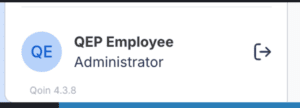
App Version Display in Sidebar Footer QOIN-941
The application version (e.g., Web 4.3.8) is now visible in the sidebar footer. Operations and support teams can immediately confirm which version is deployed after each release — eliminating guesswork when troubleshooting.
[ATTACH: Screenshot of sidebar footer showing “Web 4.3.8” version label]
⚡ Improvements
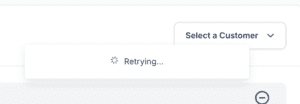
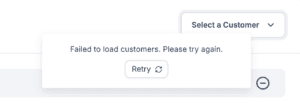
Select Customer Dropdown — Loading & Error UX QOIN-1067
The customer-selection dropdown on Sale, Add Invoice, and Add Recurring screens now shows a loading spinner while fetching data instead of incorrectly displaying “No results found.” If the fetch fails, a friendly error message with a Retry button appears. If the session has expired, Retry forces a logout, preventing silent failures. Also applies to Edit Invoice and Edit Recurring.
[ATTACH: Screenshot of loading spinner in dropdown vs. old “No results found” state]
Google reCAPTCHA v2 & v3 — Greenfield Environment QOIN-1063
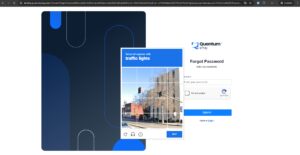
Bot protection has been configured for the Greenfield environment. reCAPTCHA v2 (Challenge) is now active on the Identity Server for Forgot Password and Change Password flows. reCAPTCHA v3 (Score-based, invisible) is active on the Qoin Payment Link. All keys are securely managed via GitOps secrets.
[ATTACH: Screenshot of reCAPTCHA challenge on Forgot Password screen]
🐛 Bug Fixes
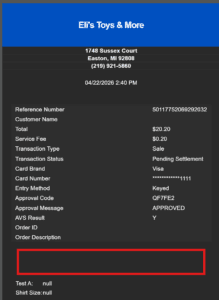
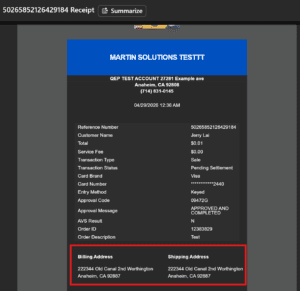
Missing Billing & Shipping Info in Transaction Email Receipts QOIN-873
What was wrong: After processing a transaction, email receipts were sent without any billing or shipping address — even when the customer had entered full details.
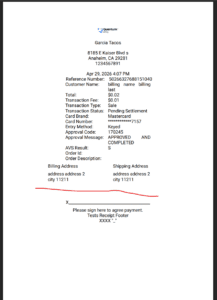
What’s fixed: Email receipts now correctly include complete billing and shipping information for all transaction types: Sale, Authorization, Credit, Invoice, Payment Link, and Recurring — for both automated and manually triggered receipts.
[ATTACH: Side-by-side email receipt — before (missing address) vs. after (address shown)]
Print Receipt Showing “?” in Place of Spaces in Addresses QOIN-890
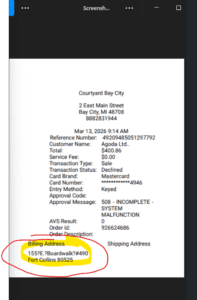
What was wrong: When printing a receipt, spaces in billing addresses were being replaced by ? characters, making printed receipts unreadable. This was caused by non-standard Unicode whitespace characters stored in the database.
What’s fixed: The CreditCard API now normalizes all Unicode whitespace to standard ASCII spaces before saving, ensuring Print Receipt output renders cleanly and consistently.
[ATTACH: Screenshot of Print Receipt before (? characters) and after (correct spacing)]
Login Page Double-Reload on First Access via Gateway URL QOIN-857
What was wrong: Opening the application for the first time via the gateway URL in a new browser session caused the login page to reload twice, creating a visible flicker and occasional confusion for users.
What’s fixed: The login page now loads exactly once on initial access. No more double-reload or screen flicker.
[ATTACH: Before/after screenshot or screen recording showing single load]
Before
After
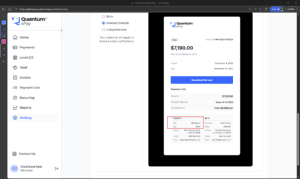
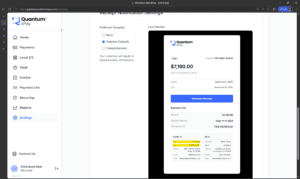
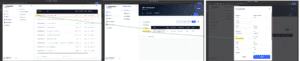
Invoice Paid Template Preview Showing Placeholder Text on Branding Page QOIN-879
What was wrong: The Invoice Paid email template preview on the Branding page was displaying raw placeholder tokens ({{MID}}, {{DBA}}) instead of sample UI content, making it impossible to verify how the branded email would actually look.
What’s fixed: The preview now renders correct sample UI content so merchants and admins can visually verify their email branding before going live.
[ATTACH: Screenshot of Branding page template preview before vs. after fix]
Before
After
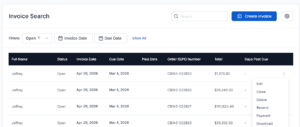
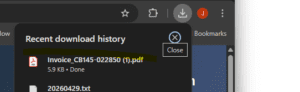
Bulk Invoice Upload — Unable to Download Invoices QOIN-915
What was wrong: Invoices created through the Bulk Invoice Upload feature could not be downloaded from the Invoice Search page. A duplicate data:application/pdf prefix was accidentally prepended to the PDF content during upload, corrupting the stored file.
What’s fixed: The duplicate URI prefix has been removed. Bulk-uploaded invoices now download correctly, consistent with manually created invoices.
[ATTACH: Screenshot of successful invoice download from Invoice Search after fix]
Failed Batches Showing Incorrect MIDs for BINs 478929 & 424832 QOIN-826
What was wrong: The Failed Batches page was displaying truncated MIDs for BINs 478929 and 424832 — the leading 9271 prefix was missing, causing the displayed MID to not match other screens such as Admin → Merchants.
What’s fixed: The Failed Batches page now displays the full, correct MID for all BINs, consistent across all screens in the platform.
[ATTACH: Screenshot of Failed Batches MID before (truncated) and after (full MID shown)]
Fix
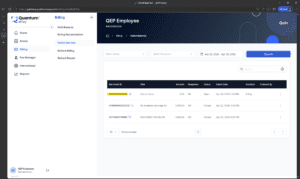
Paid Invoice Notifications Sent to Outdated Email After User Email Change QOIN-805
What was wrong: When a user updated their email address, automated Paid Invoice notification emails continued to be delivered to their old address. Notification subscriptions were not updated when the user’s email changed.
What’s fixed: When a user email is updated, all notification subscriptions are now migrated to the new email address — without creating duplicates. Paid Invoice emails will reach the correct, current inbox going forward.
[ATTACH: Screenshot showing Paid Invoice notification delivered to updated email address]
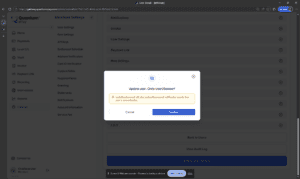
Admin
Merchant
Need Help?
If you have any questions about this update, our support team is here to help.


